We recommend using the JazzCash application for deposits.
If you’re using a Jazz mobile number, you can also deposit via the Jazz application.
Please don’t use a third-party account/application.
Refer to this article for detailed instructions. 
Important:
Please use only the official JazzCash application.
Do not use a third-party account or application to make your deposit.
Always double-check the recipient’s bank account number, IBAN, and reference mobile number before confirming the transaction.
Please refer to this article for detailed instructions.
Step 1. In the traderoom, click the “Deposit” button in the top right corner of the screen. Choose your country and the payment method you’ve decided to make a deposit with.
Step 2. Enter your deposit amount, scroll down, enter additional information if needed, and click “Deposit”.
Step 3. Confirm that all the details are correct and click “Submit”.
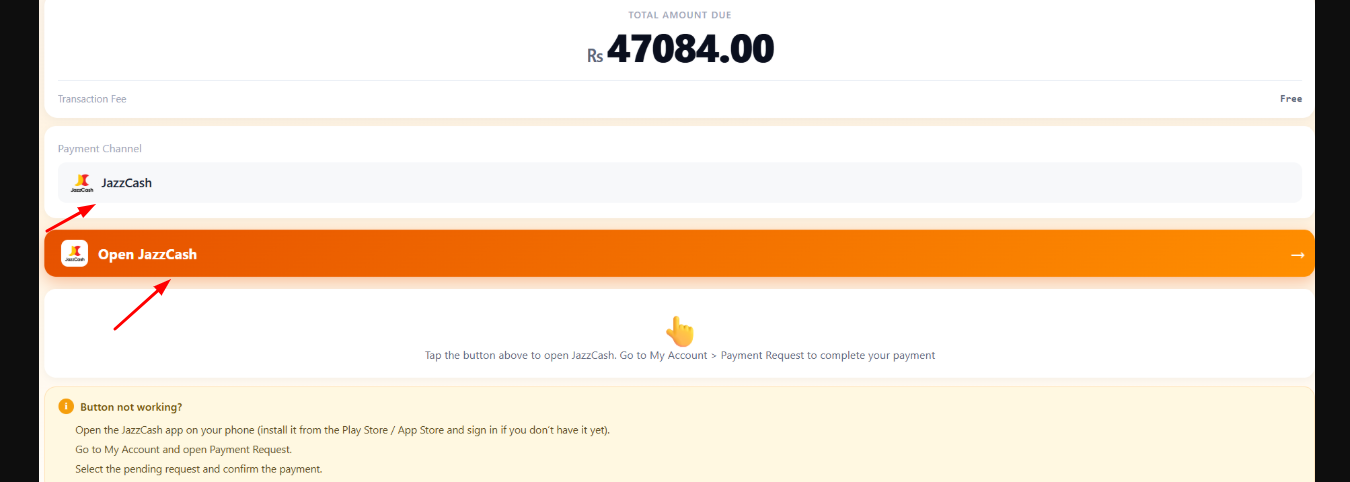
Now open the JazzCash application.
Steps in the JazzCash app
- Open the JazzCash app.
- Tap “Money Transfer”.
- Select “Bank” / “Bank Transfer”.
- Select the recipient’s bank. (JazzCash)
- Enter the recipient’s bank account/IBAN/ reference mobile number and other required details.
- Enter the amount you want to send.
- Carefully check the account title/name, account number/IBAN, and amount.
- Confirm the transaction. Review all details to ensure accuracy, then tap "Send now." Record the Transaction ID for your reference. Important. Don’t forget to enter the correct reference mobile number/account number. Otherwise, it might take up to 72 hours to process your deposit.
- Confirm the transaction with the JazzCash MPIN or Touch ID. Take note of the Transaction ID of the payment (TID).
-
You should receive a confirmation once the transfer is completed.
- Go back to the Binomo deposit details page and enter the Transaction ID (TID) from the previous step in the “Enter TID” field. Click the “Verify” button
- Click “Complete my transaction”.
- Your payment has been processed successfully.
- To check the status of your transaction, click the “Deposit” button in the top-right corner of the screen and then click on the “Transaction history” tab.
- Click on your deposit to track its status.